Member story coming soon.
 SmartStack
Overview
• WelcomeToday is
Setting up your SmartStack...
 SmartStack
Explore SmartStack
Product
Pricing
Trust / Banks
Help
Privacy first personal finance
Multiple budget styles with clear progress under your account lock. Free includes 0 banks. Paid bank linking is optional and never takes your bank password.
Free includes 0 bank links. We never ask for your bank password. Educational tool only, not financial advice.
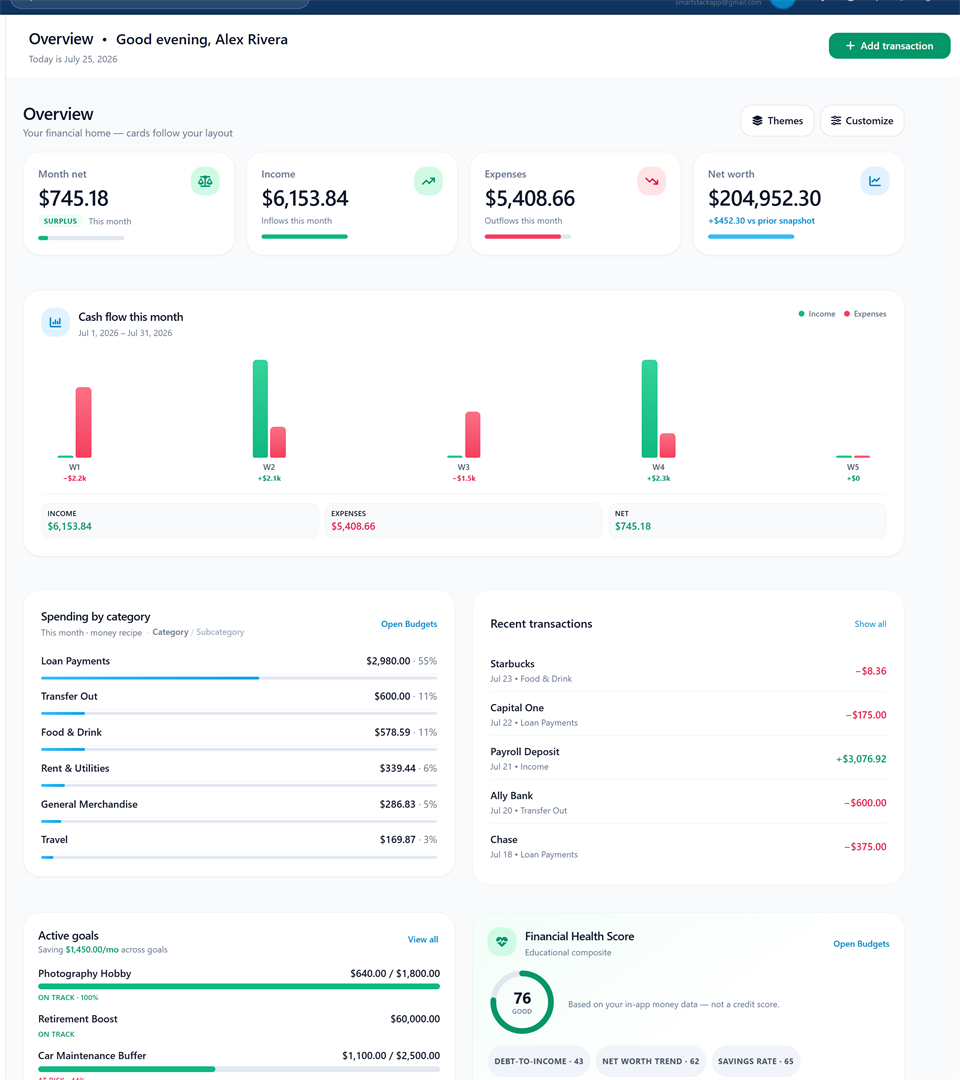
Full product screenshot · demo data · not your account
Bank linking is optional on paid plans via Plaid (Free = 0 banks). We never take your bank password.
SmartStack is a personal finance app for budgets, transactions, goals, debt, and net worth. Create a free account to start. Checkout stays in Settings when you upgrade — not on this page.
How budgeting works here
Three clear steps. Start free with 0 bank links. Optional bank linking on paid plans later. No theater, no pressure.
Step 1
Sign up in a minute. Free includes multiple budget styles and 0 bank links. No pressure to connect a bank on day one.
Step 2
Choose zero based, 50/30/20, envelopes, pay yourself first, or AI Smart Budget. Switch styles later if you want.
Step 3
Manual tracking from day one. Optional bank linking on paid plans later. Visual progress helps habits last under your account lock.
Trust signals
Transparent pricing, legal docs you can read before signup, and a public changelog. Member stories sit beside those signals — real voices only, when people choose to share.
Stories from people using SmartStack. We only share names and words with permission.
Member story coming soon.
Member story coming soon.
Member story coming soon.
Member story coming soon.
Member story coming soon.
Member story coming soon.
Create a free account to start. Free includes 0 bank links. Upgrade later in Settings when automation is worth it.
Free account. Free = 0 banks. We never ask for your bank password. Educational tool only.
Free = 0 banks. We never ask for your bank password. Educational tool only, not financial advice.
Already have an account? Sign in
Product tour
Five surfaces from the live app, shown with scrubbed demo data (not your accounts). No login on this page. Free always means 0 bank links.
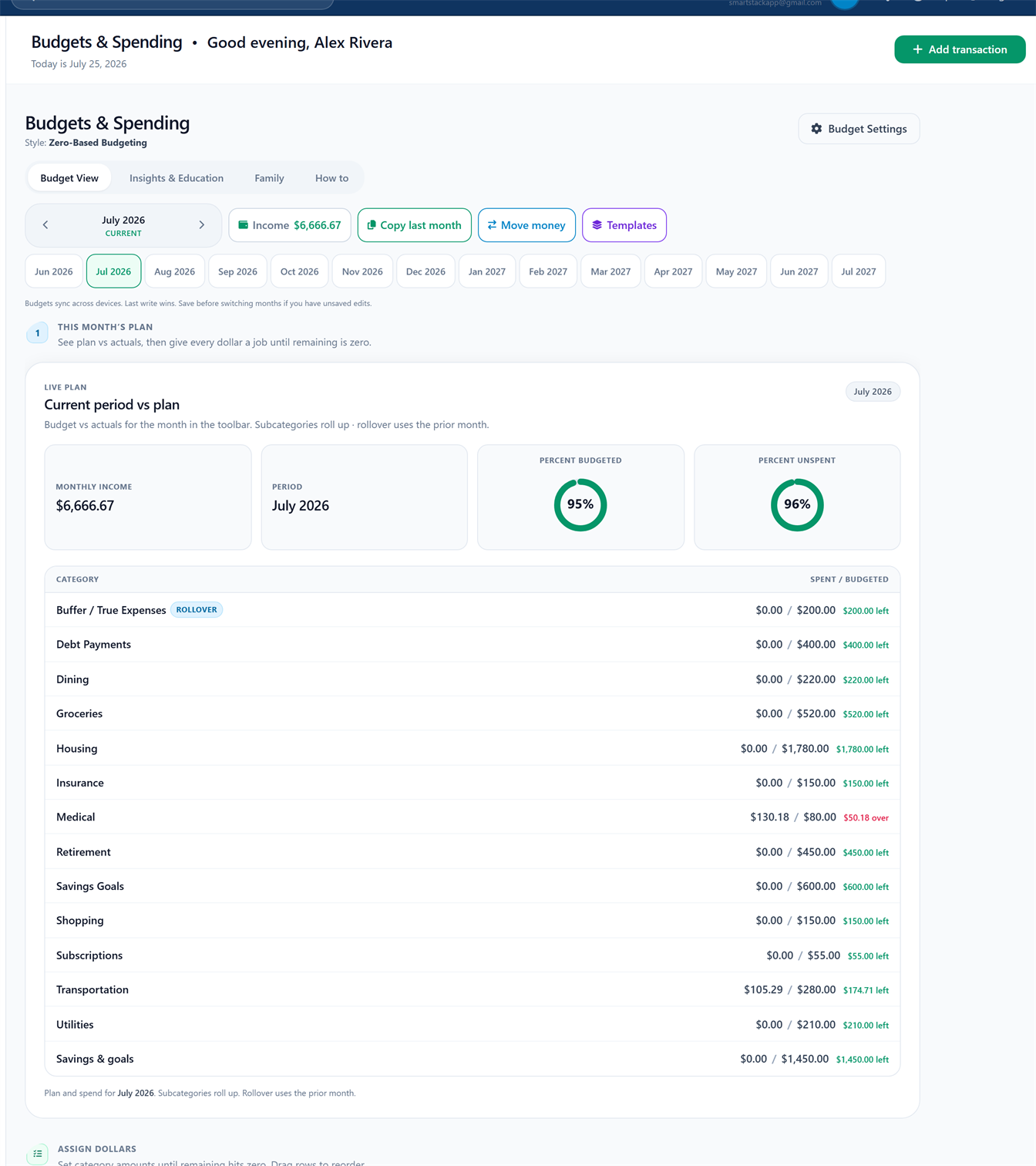
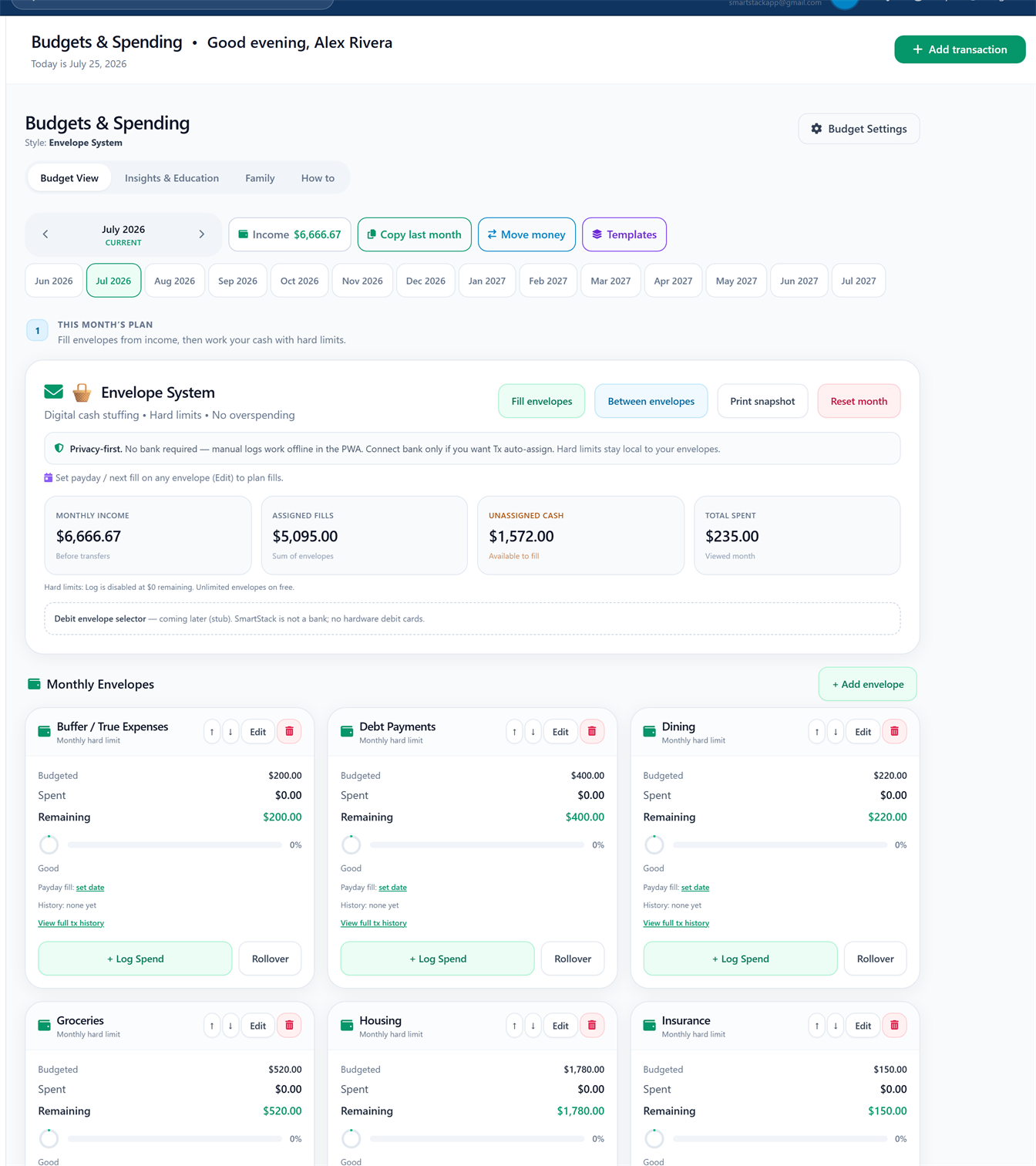
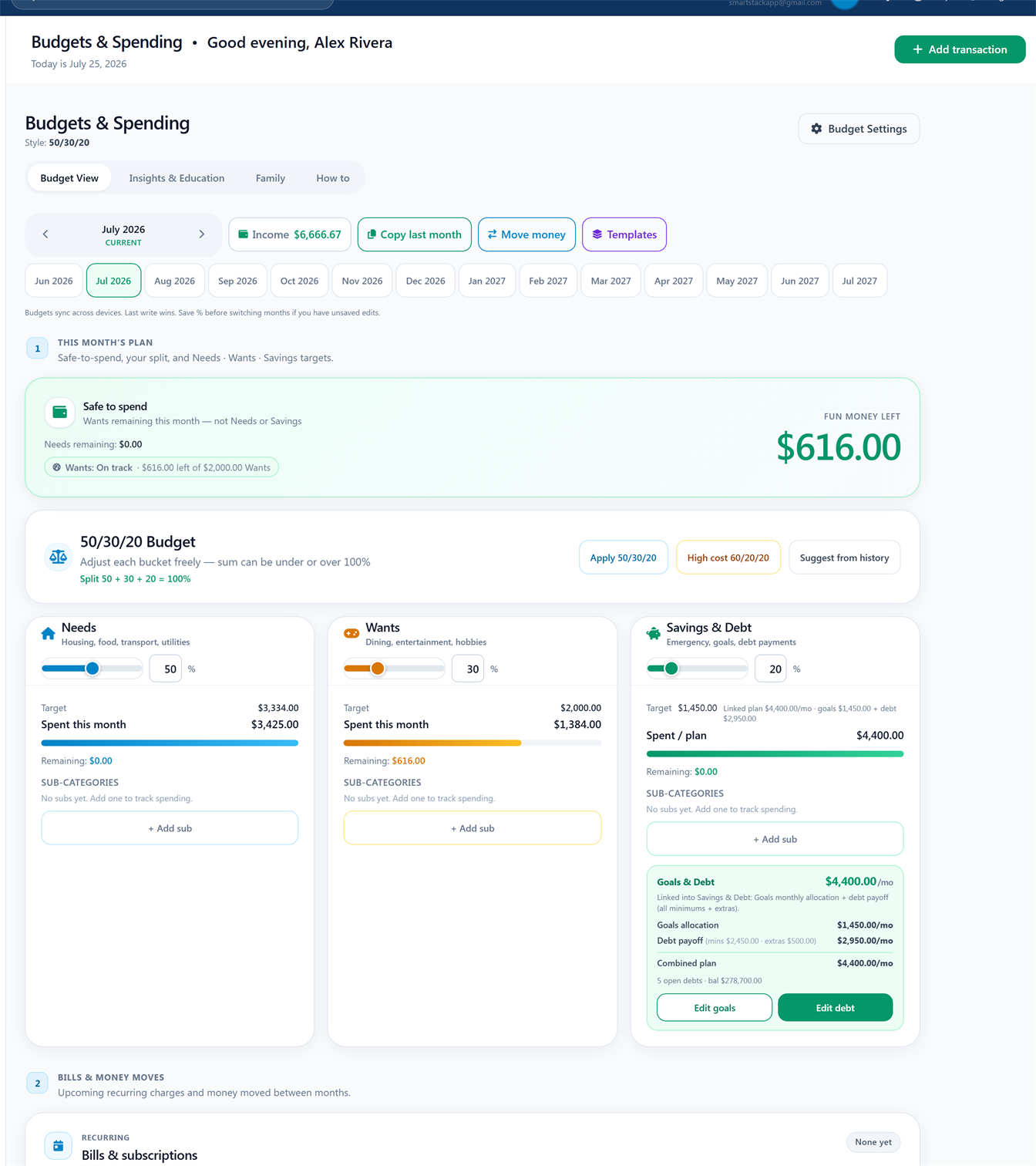
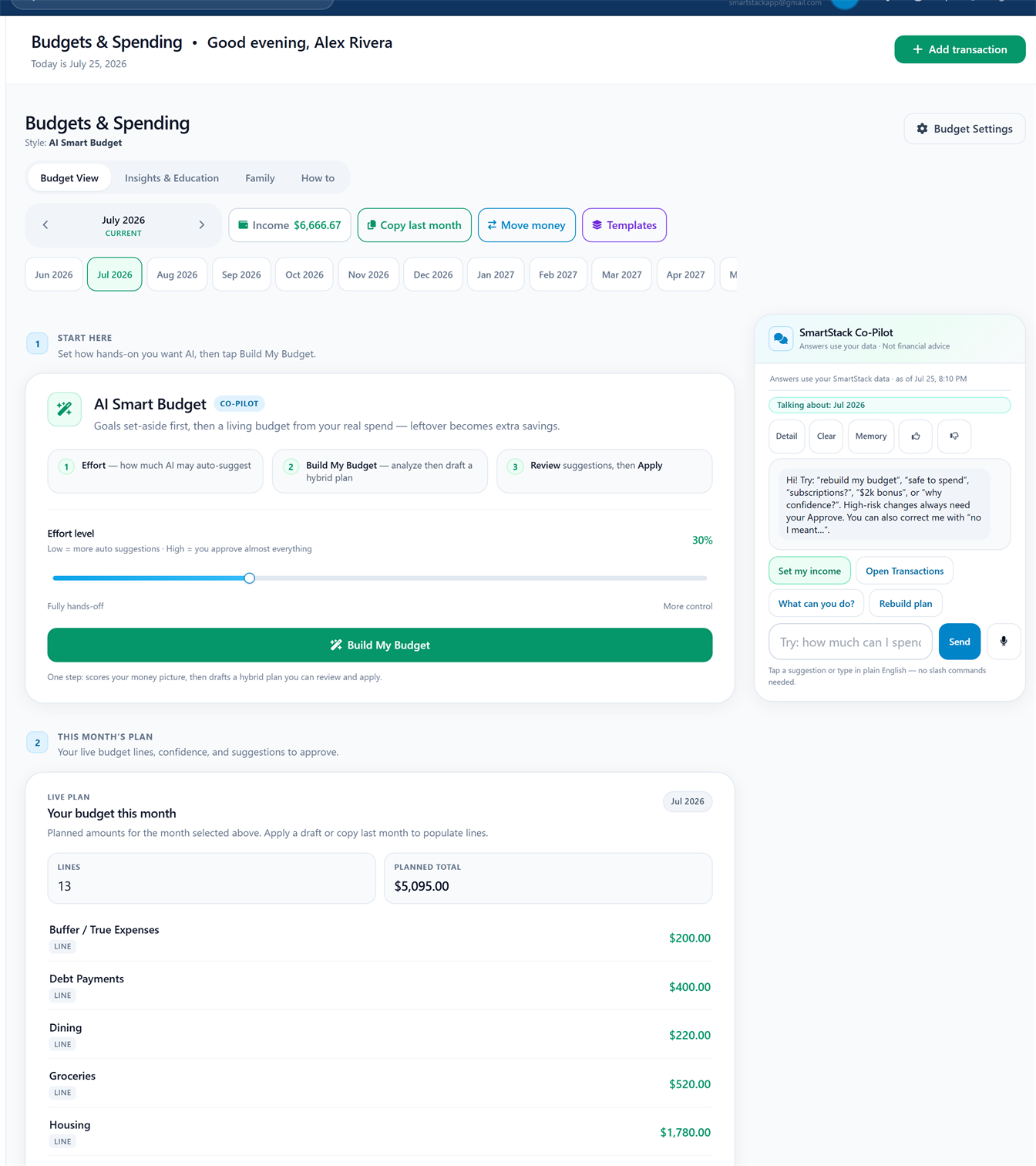
Zero-based · 1 / 4
Full Budgets tab · four styles · demo data · use Rotate
In the app Budget tab
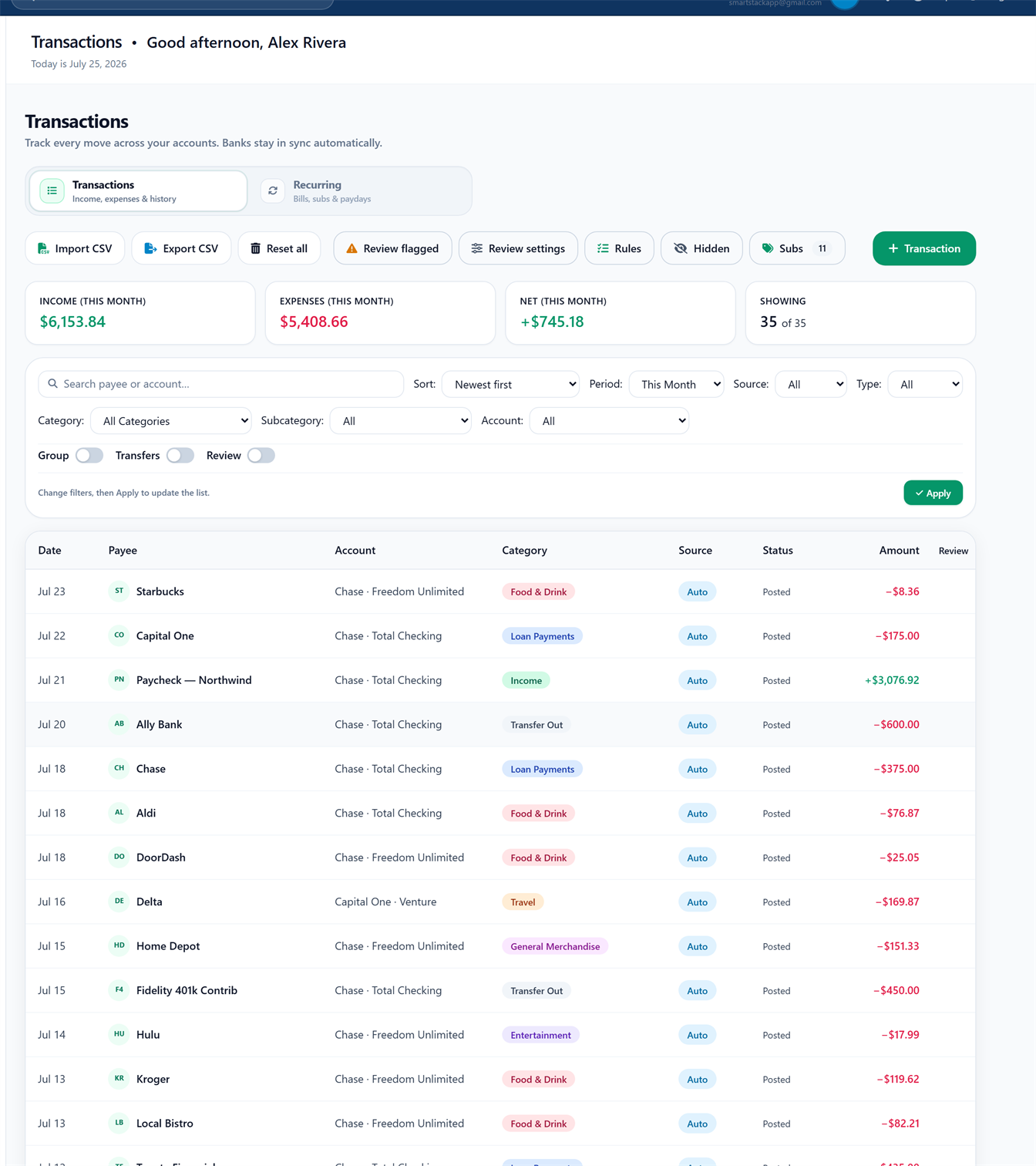
Full Transactions tab · demo data
In the app Transactions, Recurring
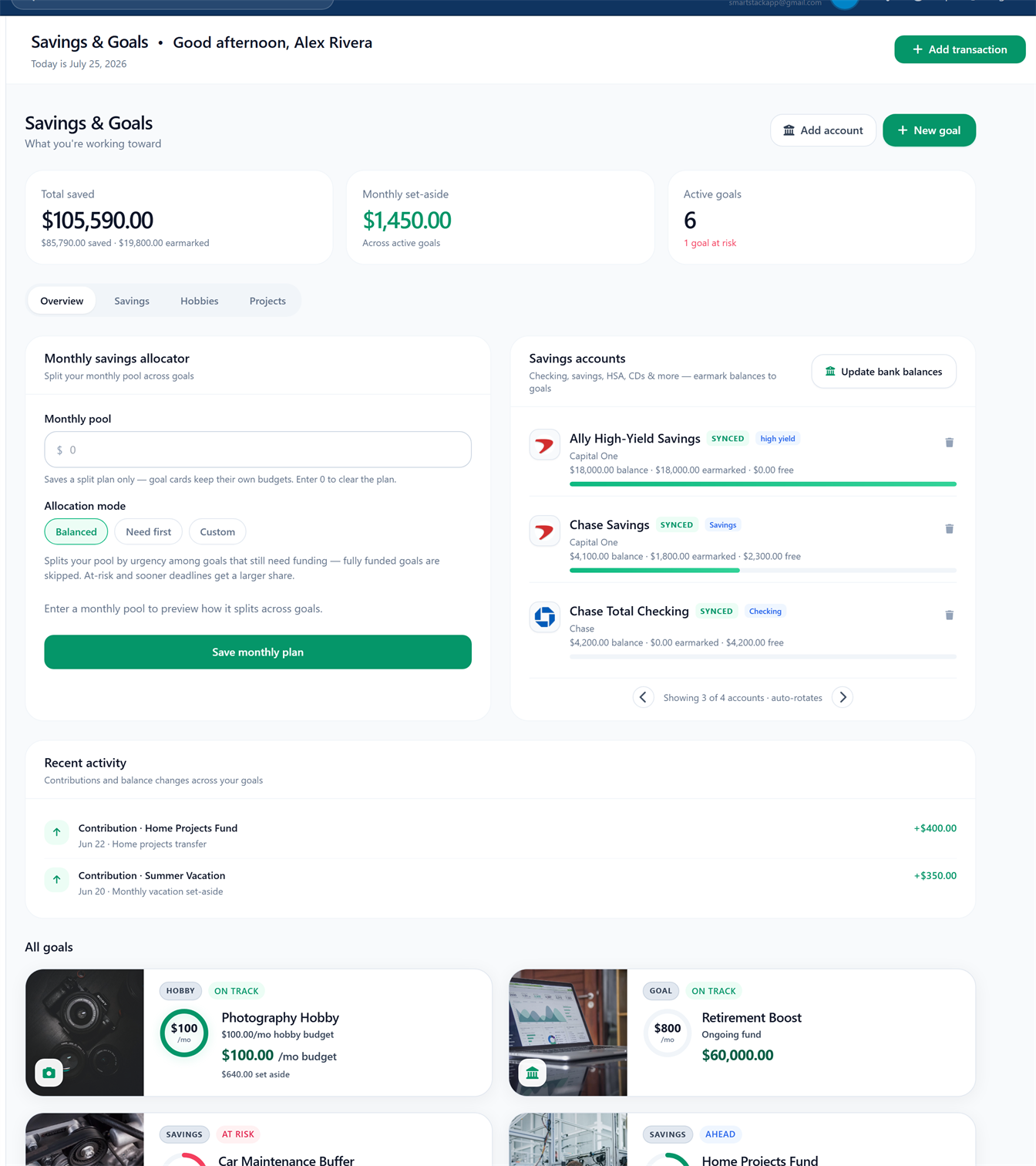
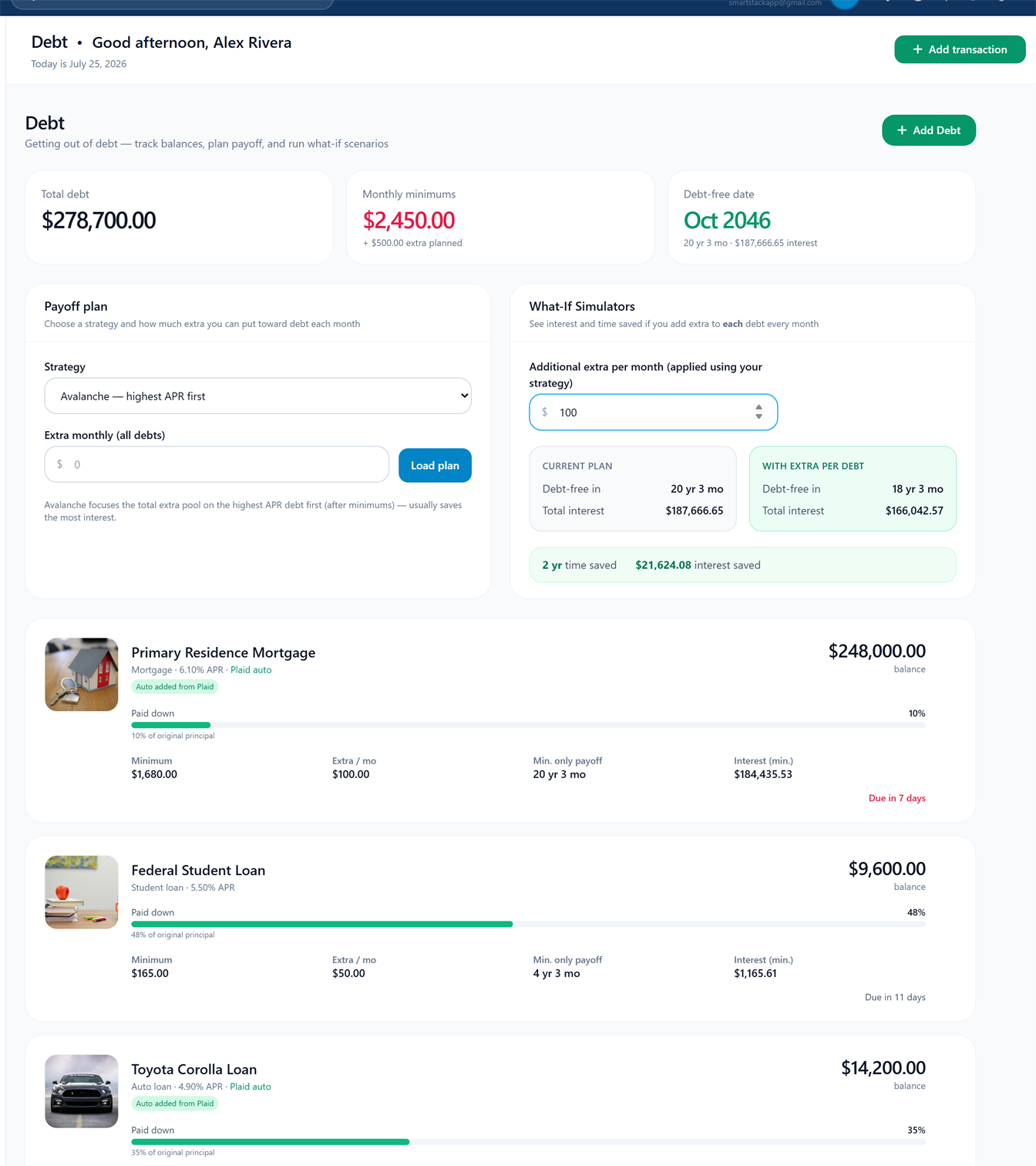
Goals · 1 / 2
Goals and Debt · demo data · use rotate for both
In the app Goals, Debt
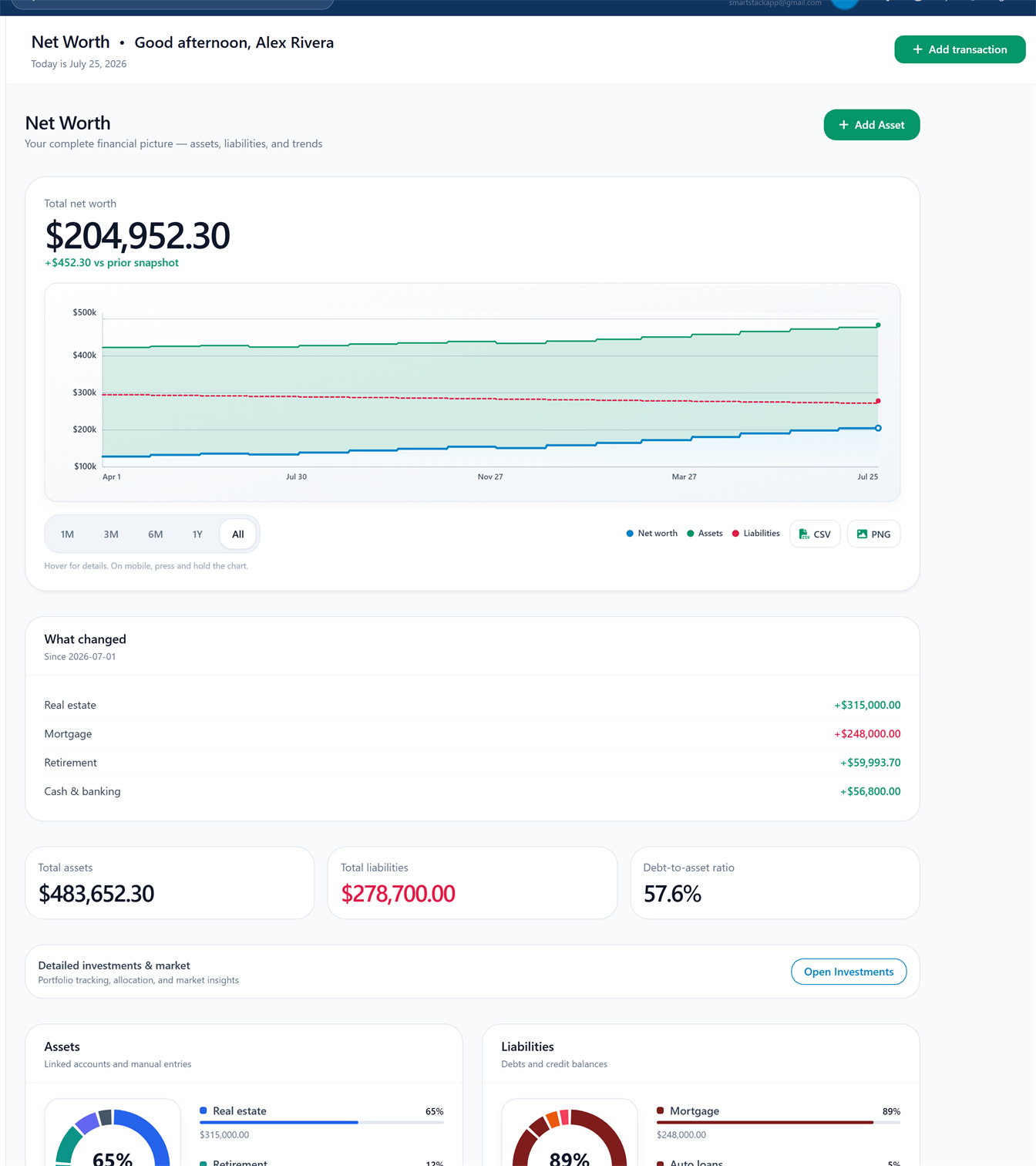
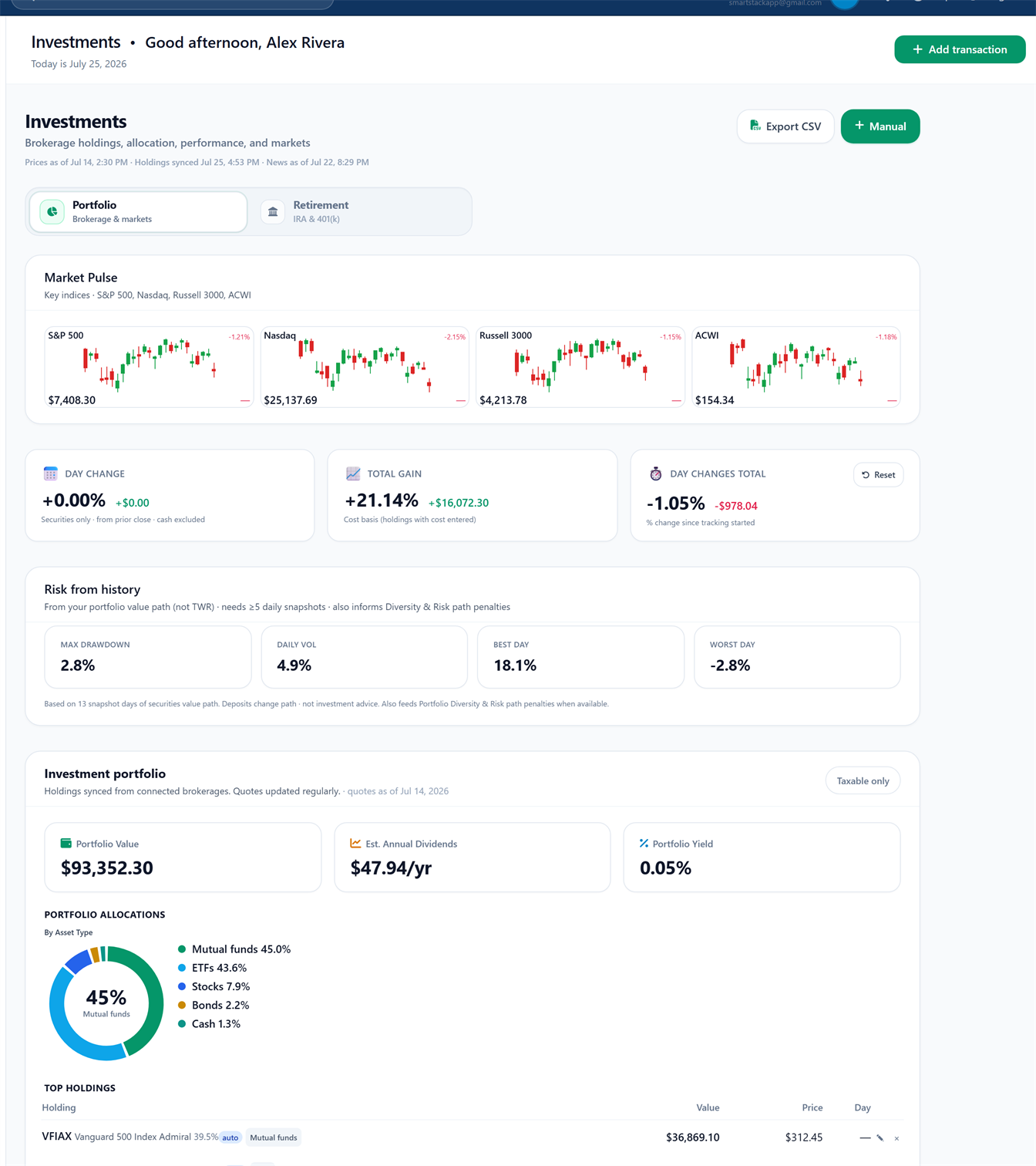
Net worth · 1 / 2
Net worth and Investments · demo data · rotate for both
In the app Net Worth, Investments
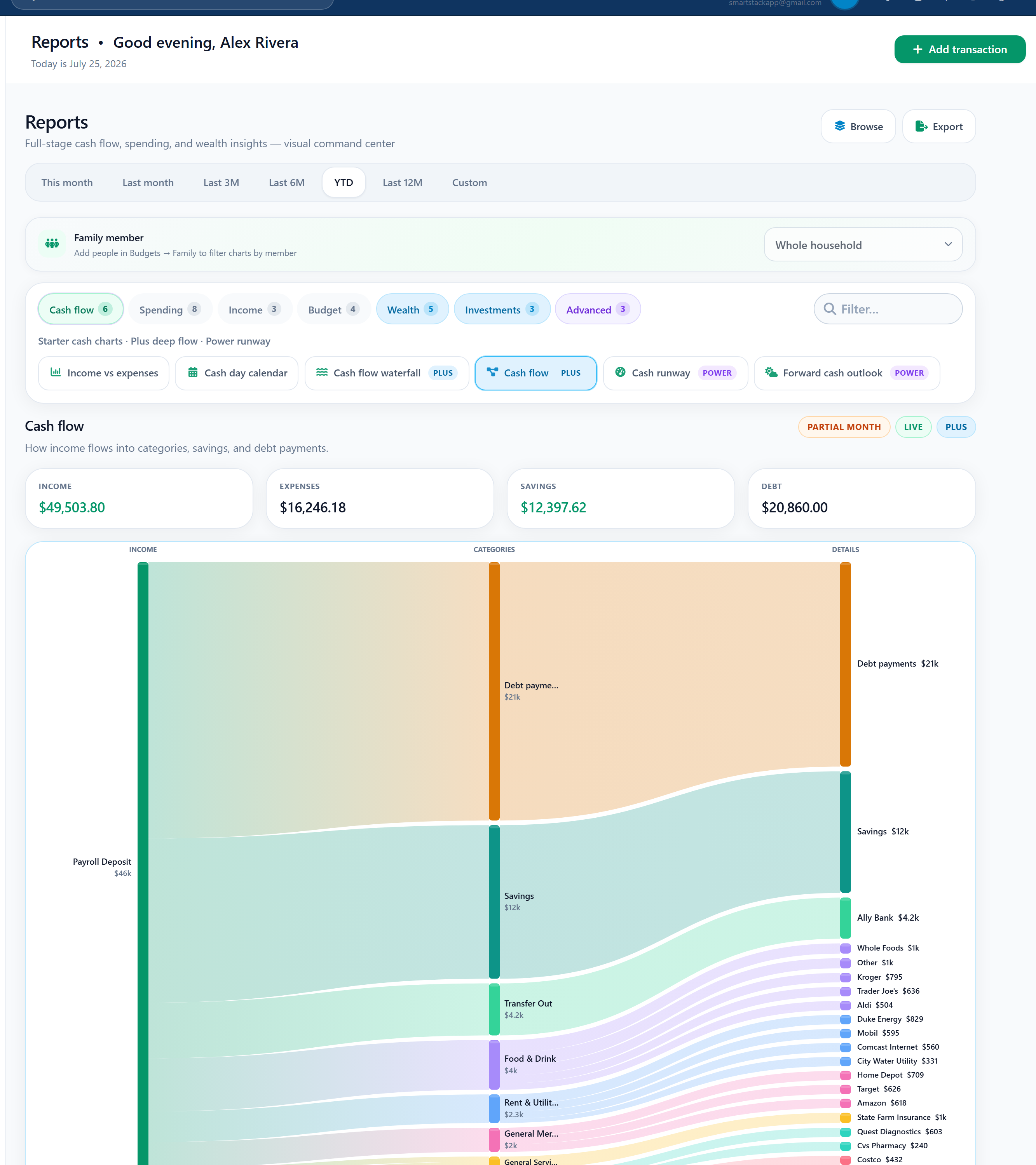
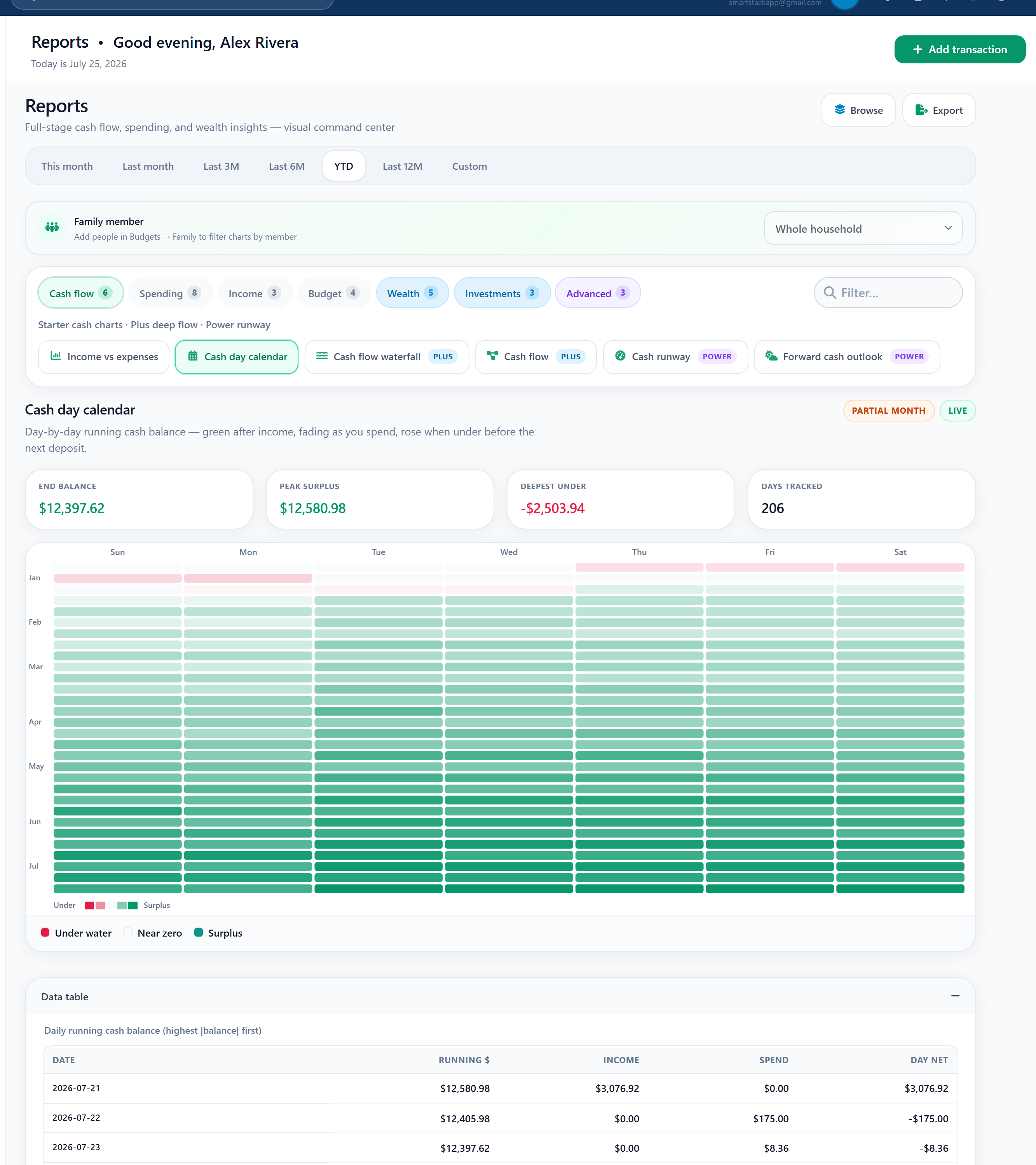
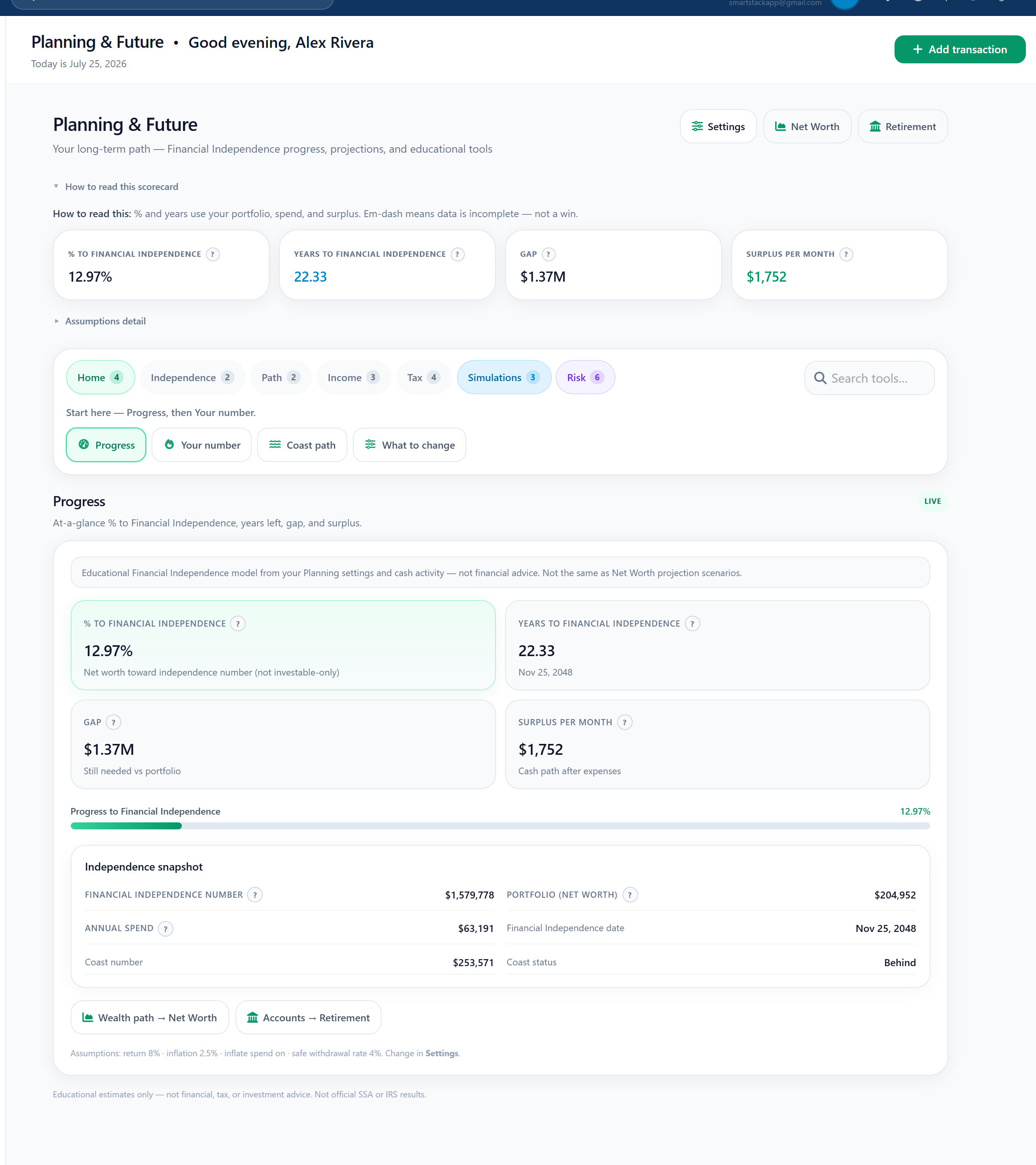
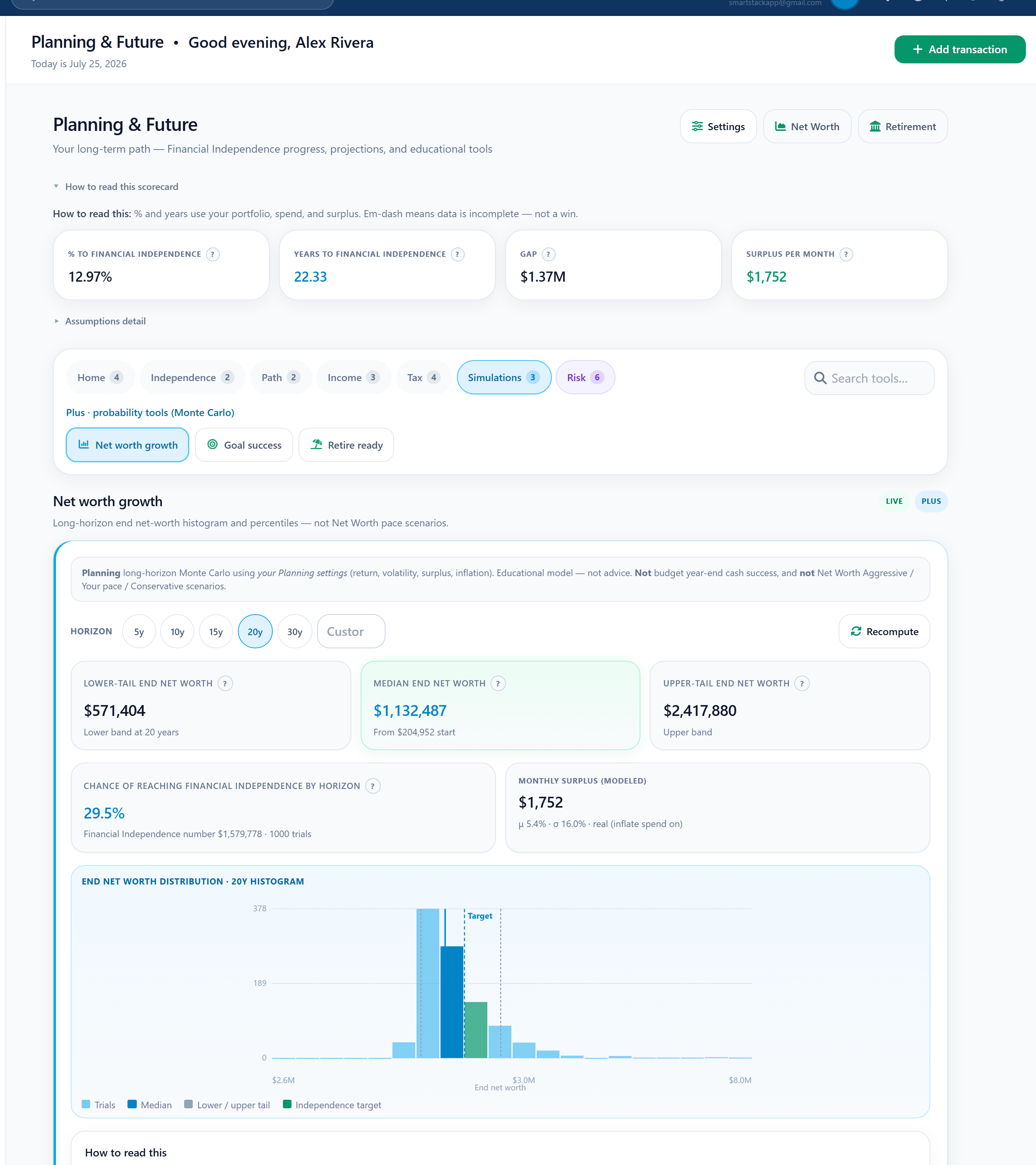
Cash flow snake · 1 / 4
Cash flow snake · Cash day calendar · Planning · Net worth Monte Carlo · demo data · Rotate
In the app Reports, Planning
Bank linking
Start with full manual tracking. Free includes 0 bank logins. Optional paid linking never asks for your bank password inside SmartStack. Your data stays under your account lock.
Example institutions
Banks and brokerages you can link
 CH
Chase
CH
Chase
 BA
Bank of America
BA
Bank of America
 WF
Wells Fargo
WF
Wells Fargo
 CO
Capital One
CO
Capital One
 CI
Citibank
CI
Citibank
 US
US Bank
US
US Bank
 PN
PNC
PN
PNC
 AL
Ally
AL
Ally
 AX
American Express
AX
American Express
 DI
Discover
DI
Discover
 FI
Fidelity
FI
Fidelity
 VG
Vanguard
VG
Vanguard
 CS
Charles Schwab
CS
Charles Schwab
 ET
E*TRADE
ET
E*TRADE
 TD
TD Ameritrade
TD
TD Ameritrade
 RH
Robinhood
RH
Robinhood
Logos for recognition only — examples people often link through Plaid on paid plans. Not an endorsement or partnership. Availability varies by bank and region. Free stays at 0 bank logins. SmartStack never asks for your bank password.
Free includes multiple budget styles and manual tracking with 0 bank logins. Connect later only if you want automation.
When you connect on a paid plan: Starter up to 1, Plus up to 4, Power up to 8. Limits match product configuration, not marketing fluff.
We never ask for your bank username or password inside SmartStack forms. Optional linking uses an industry link flow (Plaid) on paid plans. Read-oriented access, not money movement by us.
Your data lives in a secure cloud database tied to your account so phone and desktop stay in sync. Other customers cannot read your rows. Multi-device by design, not a single-device file that never reaches the cloud.
Export from Settings without bank tokens or secrets. Deletion and retention follow the Privacy Policy. Ownership includes a real exit path.
We build finance tools without dark patterns: no fake scarcity, no forced banks on Free, and no invented compliance badges on this page.
Common blockers, answered in plain language, with links to FAQ, privacy, and plans when you want more detail.
That’s valid. Free includes multiple budget styles, manual transactions, goals, debt, and net worth baseline. Bank connections on Free = 0. Upgrade only when automation is worth it.
Any real money system has a learning curve. SmartStack is designed for visual progress and style fit, not shame streaks or artificial scarcity urgency.
Family budgeting tools unlock on Plus and Power. Free and Starter are individual first.
We do not sell your personal financial data for advertising. See the Privacy Policy for subprocessors and privacy respecting analytics.
No. SmartStack uses a secure cloud account with row-level security so multi-device sync works. It is not a single-device file product that never syncs.
Yes. Export from Settings without bank tokens or secrets. Deletion details are in the Privacy Policy.
Every feature below exists to make good money habits easier, not noisier.
Features
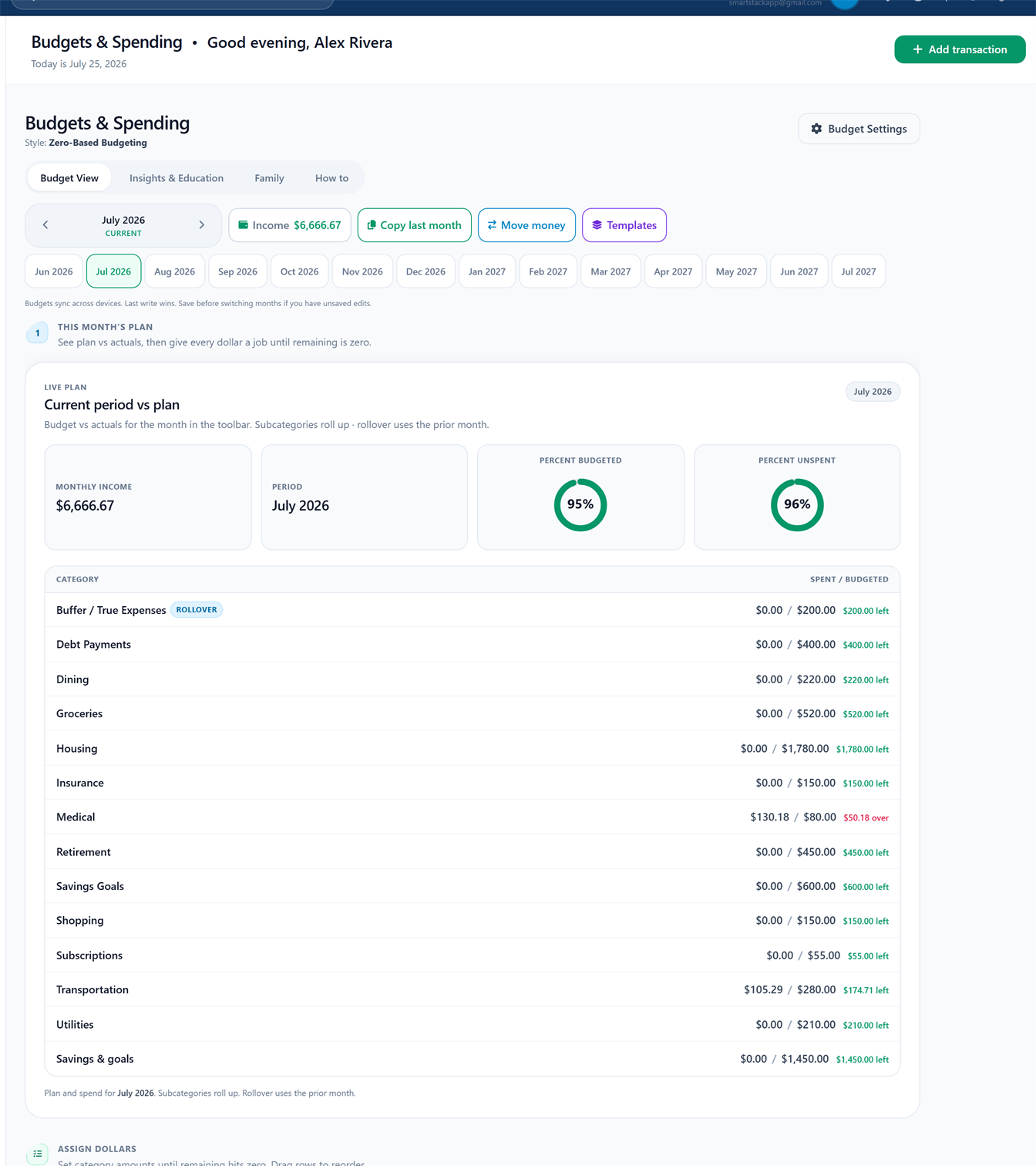
Zero-based · 1 / 4
Budgeting · multiple styles · demo data · use Rotate
Zero based, 50/30/20, envelopes, pay yourself first, and AI assisted planning in one product.
In product Budget tab, style switcher
Why it helps you stick: The right system lowers friction so you open the app mid month, not only in January.
Give every dollar a job with clear left to assign and category status.
In product ZBB Budget view
Why it helps you stick: Ambiguity is what breaks budgets; assignment makes progress visible.
Bars, status, and pace cues instead of raw spreadsheets alone.
In product Budget insights and progress chrome
Why it helps you stick: Eyes understand progress faster than tables of numbers.
Starter+ templates; plan ahead with month navigator (horizon by tier).
In product Budget templates, month navigator
Why it helps you stick: Starting from blank is the drop off; templates and forward months keep momentum.
Features
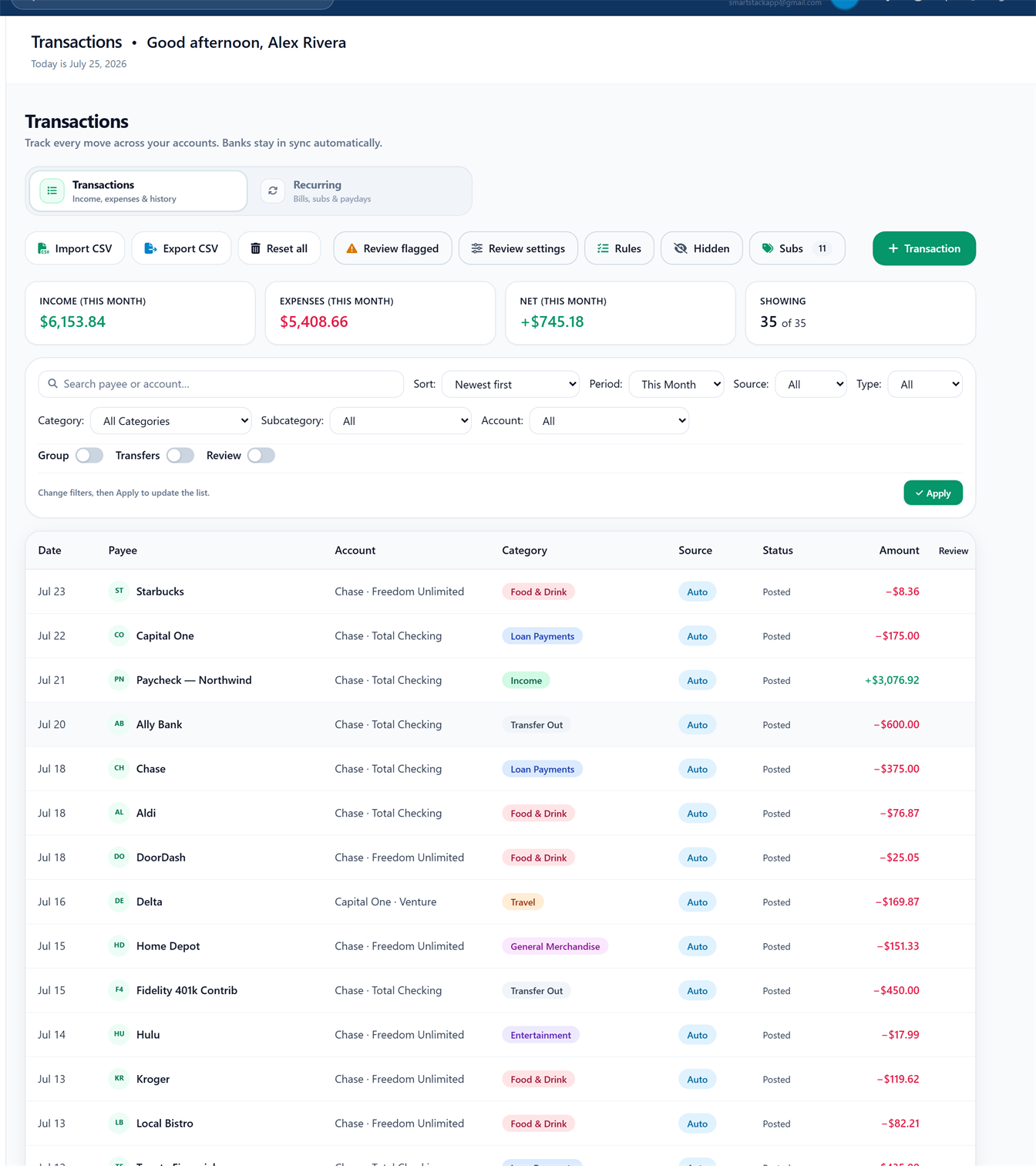
Money flow · demo data
Build your home dashboard with themes and card order. Layout customize is free on every plan. Some live cards unlock with Starter, Plus, or Power. Simulations stay educational and open in their full tabs, not as fake free previews.
In product Overview tab, Customize and Themes
Why it helps you stick: A home screen that matches your priorities gets opened more often than a fixed stack of cards you ignore.
Manual tracking that stays usable without a bank link.
In product Transactions tab
Why it helps you stick: Free plan is real work, not a teaser that forces Plaid on day one.
Calendar aware recurring bills and income patterns.
In product Transactions, Recurring
Why it helps you stick: Surprises kill plans; seeing what’s coming reduces anxiety.
Cleaner payee names and history aware category help.
In product Transactions, payee normalization
Why it helps you stick: Less cleanup means less “I’ll do it later.”
Connect when ready on paid plans (Starter 1, Plus 4, Power 8). Free = 0 bank links.
In product Settings, Plaid (paid tiers)
Why it helps you stick: No forced linking means you can build habits without a permission panic.
Features
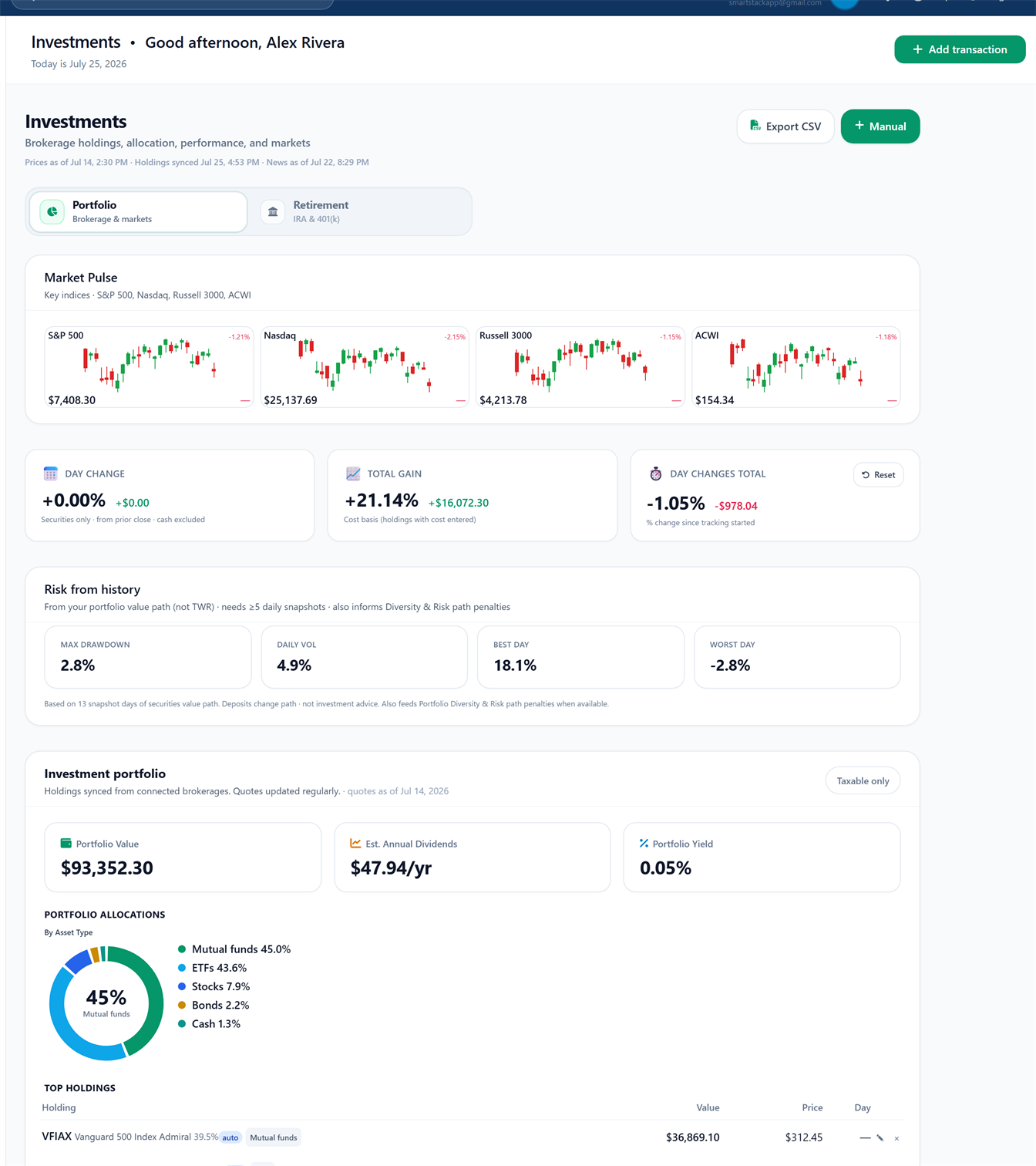
Wealth · demo data
Track savings targets alongside the budget you already run.
In product Goals
Why it helps you stick: Goals without a budget become wishes; together they stick.
See balances and payment context without leaving your money system.
In product Debt tab
Why it helps you stick: Debt ignored is debt that grows; a dedicated surface keeps it in view.
Overall picture with manual assets and liability awareness. Free tier included.
In product Net Worth tab
Why it helps you stick: Budgets alone miss the balance sheet story.
Holdings workspace for Plus and Power; advanced tools on Power.
In product Investments tab
Why it helps you stick: When you’re ready, portfolio context sits next to cash budgeting, not a separate app.
Features
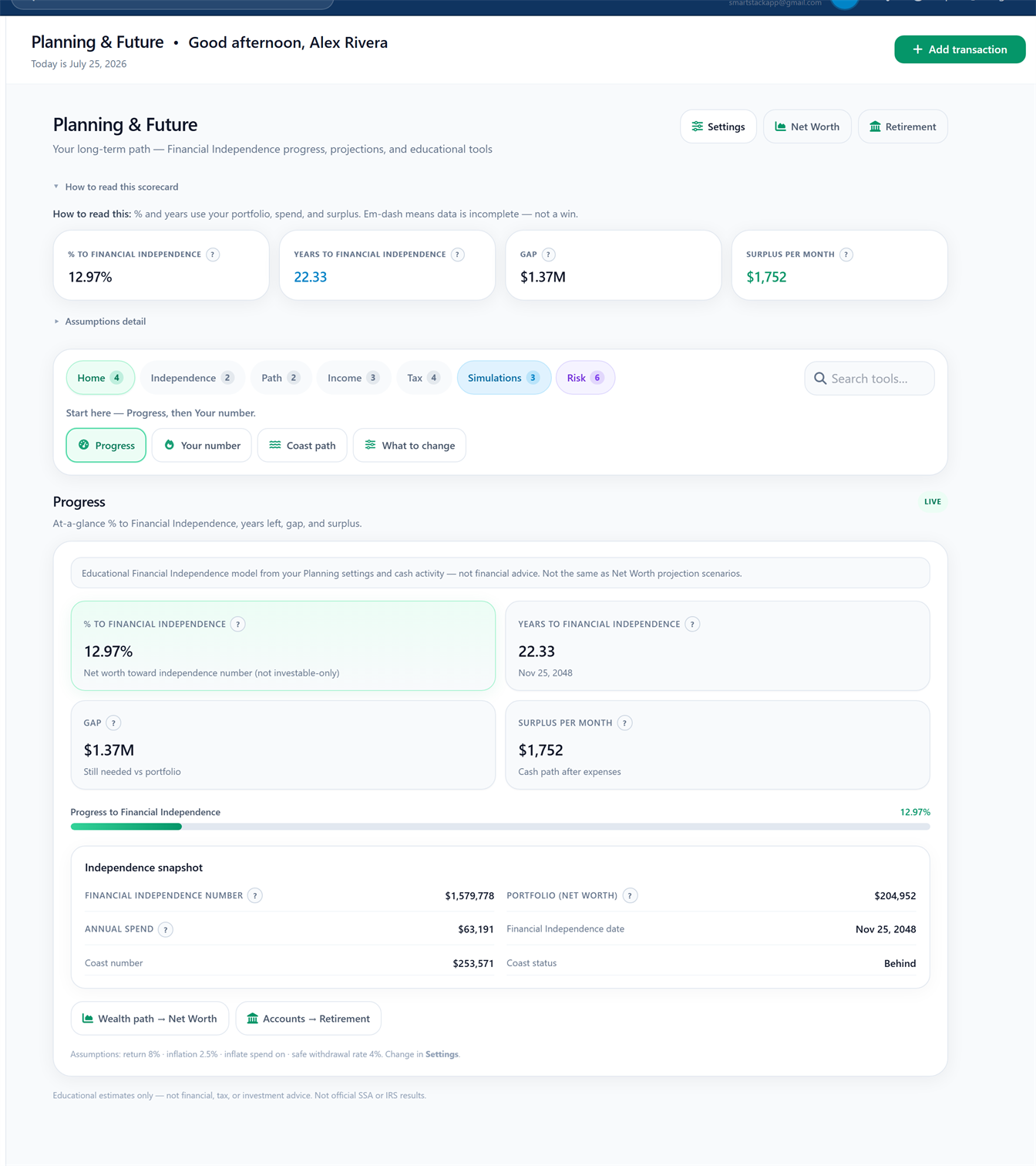
Planning · demo data
Insights and recommendations when you unlock Starter.
In product Reports tab
Why it helps you stick: Patterns turn vague stress into specific next steps.
FIRE, retirement, and tax oriented planning tools on Plus and above.
In product Planning tab
Why it helps you stick: Long range questions need a dedicated surface, not only monthly categories.
Multi-device sync under your account; other customers cannot read your rows.
In product Auth + Supabase RLS
Why it helps you stick: Trust lowers avoidance. You track more carefully when the data model is clear.
Export from Settings; installable PWA with offline help for core flows. Cloud remains source of truth.
In product Settings export, PWA
Why it helps you stick: Exit freedom and phone install make the product feel owned, not trapped.
Pick the path that matches how you work with money today, not invented customer stories.
Optional illustration · not a stock customer photo
Who You want real budgeting habits without linking a bank on day one.
Pain Most free tiers feel like demos that push paid bank sync immediately.
You get multiple budget styles, transactions, goals, debt, and net worth baseline with 0 bank links.
Optional illustration · not a stock customer photo
Who You’re ready for one linked bank and clearer reports.
Pain Typing everything forever burns out good intentions.
You get Starter path: 1 bank connection, reports, templates, fuller history.
Optional illustration · not a stock customer photo
Who You want family context, investments, and longer range planning.
Pain Month only tools ignore the bigger balance sheet story.
You get Plus path: up to 4 banks, Planning & Future, investments, family tools.
Optional illustration · not a stock customer photo
Who You want maximum bank capacity and CoPilot depth when you’re ready.
Pain Basic apps stop short of advanced investing tools and assistant workflows.
You get Power path: up to 8 banks, AI CoPilot chat, advanced investments. Still educational, not advice.
Interactive teasers run entirely in your browser. No bank connection, and no answers stored. Free bank links always equal zero on the plan recommender.
Interactive panel chrome · not a product screenshot
Answer a few preference questions for a suggested style (ZBB, 50/30/20, Envelope, Pay yourself first, or AI Smart).
Interactive panel chrome · not a product screenshot
Estimate Free, Starter, Plus, or Power from bank needs and unlocks. Not a checkout.
Educational estimate only. Not financial advice. Bank limits match product entitlements (Free = 0).
Products change. Verify competitors’ current plans before you buy.
Account locked cloud + RLS; export/delete path; no bank passwords in our forms
Cloud account products with strong category discipline
Cloud finance hubs with broader tracking surfaces
File on your drive until you share it. Easy to lose or desync
Several real styles in one product (ZBB, 50/30/20, envelopes, PYF, AI assisted)
Usually one primary method done deeply
Varies; often tracking first
Whatever you build and maintain
Real Free core with 0 bank links. Manual habits fully supported
Often trial or limited free
Usually paid subscription first
Free tools, expensive time
Optional; paid tiers only for Plaid links
Often optional but product expects imports
Usually designed around linked accounts
Manual only unless you script imports
First class bars, status, and insights chrome
Strong assignment feedback
Dashboards and charts vary by product
DIY charts
Reports Starter+; deeper multi month on higher tiers
Reports focused on budget method
Broad spend analytics common
Pivot tables if you build them
Planning tab Plus+; advanced planning tools on Power
Usually budget month focused
Some products add net worth and invest views
Possible with heavy DIY models
Investments Plus+; advanced diversity/news on Power
Typically out of scope
Often includes investment tracking
Manual portfolio sheets
Family tools Plus+ (member caps by tier)
Household sharing varies by plan
Household features common on paid plans
Shared file chaos unless disciplined
PWA install; offline help for core reads/queued writes; cloud SoT
Mobile apps common
Mobile apps common
Offline files, sync problems
Product UI for multiple budget styles. Still a real system, not a 5 minute toy
Method learning curve is famous for a reason
Dashboard density can overwhelm
Infinite flexibility, zero guidance
Free core; Starter, Plus, or Power for banks and depth (prices on page)
Typically subscription
Typically subscription
Free software, paid attention
| Dimension | SmartStack | YNAB style apps | Monarch or Rocket Money style | Spreadsheets |
|---|---|---|---|---|
| Privacy and data model | Account locked cloud + RLS; export/delete path; no bank passwords in our forms | Cloud account products with strong category discipline | Cloud finance hubs with broader tracking surfaces | File on your drive until you share it. Easy to lose or desync |
| multiple budget styles | Several real styles in one product (ZBB, 50/30/20, envelopes, PYF, AI assisted) | Usually one primary method done deeply | Varies; often tracking first | Whatever you build and maintain |
| Free tier usefulness | Real Free core with 0 bank links. Manual habits fully supported | Often trial or limited free | Usually paid subscription first | Free tools, expensive time |
| Bank linking required? | Optional; paid tiers only for Plaid links | Often optional but product expects imports | Usually designed around linked accounts | Manual only unless you script imports |
| Visual progress | First class bars, status, and insights chrome | Strong assignment feedback | Dashboards and charts vary by product | DIY charts |
| Reports & insights | Reports Starter+; deeper multi month on higher tiers | Reports focused on budget method | Broad spend analytics common | Pivot tables if you build them |
| Planning, FIRE, and retirement | Planning tab Plus+; advanced planning tools on Power | Usually budget month focused | Some products add net worth and invest views | Possible with heavy DIY models |
| Investments workspace | Investments Plus+; advanced diversity/news on Power | Typically out of scope | Often includes investment tracking | Manual portfolio sheets |
| Family budgeting | Family tools Plus+ (member caps by tier) | Household sharing varies by plan | Household features common on paid plans | Shared file chaos unless disciplined |
| Installable and offline help | PWA install; offline help for core reads/queued writes; cloud SoT | Mobile apps common | Mobile apps common | Offline files, sync problems |
| Learning curve | Product UI for multiple budget styles. Still a real system, not a 5 minute toy | Method learning curve is famous for a reason | Dashboard density can overwhelm | Infinite flexibility, zero guidance |
| Cost model | Free core; Starter, Plus, or Power for banks and depth (prices on page) | Typically subscription | Typically subscription | Free software, paid attention |
Side by side comparison. Pick the tool you’ll still open in three months. Competitor products change; verify their current plans before you buy.
Help
Start with the FAQ. Quick answers and the glossary sit as nested tabs under Help for denser reading. All copy stays on the page for search and accessibility.
Direct answers first, with more detail when you open a question. Quick answers and glossary are nested Help tabs if you want shorter AEO cards or definitions.
Your data is tied to your account and protected with row level security; other customers can’t read your rows.
SmartStack staff do not browse your household budget as a product feature. Infrastructure providers process data to run the service under our Privacy Policy. If you connect a bank, Plaid provides read only access. We never receive your bank password.
SmartStack aims for multiple budget styles with strong visual progress and clear privacy ownership, without forcing bank linking on free users.
YNAB style discipline and Monarch style breadth are great for some people; spreadsheets are free but fragile. SmartStack is a full product workspace with transparent tiers and export.
Yes: there’s a real Free plan for core budgeting without bank links (0 bank connections).
Starter, Plus, and Power unlock bank connections and deeper features (reports, planning, investments, CoPilot). Prices are listed on this page; checkout happens after invite/signup in Settings.
SmartStack is an installable PWA with offline support for core reads and some queued writes.
Multi-device truth still lives in your secure cloud account. When you’re back online, pending changes sync. It is not an offline-only database that never reaches the cloud.
No. SmartStack is an educational budgeting and planning tool only.
Not financial, tax, investment, or legal advice. For personal decisions, consult qualified professionals.
Create a free account on this page. Accept the legal terms, complete short onboarding, and open your dashboard.
Pick a budget style, add a few transactions, and explore. Connect a bank later on a paid plan if you want automation. Already have access? Use Sign in.
Yes: export from Settings without bank tokens or secrets.
Ownership includes exit rights. See Privacy Policy for deletion and retention details.
SmartStack is a product of Ruen Ventures LLC, built with a privacy respecting, professional finance product mindset.
The goal is steady control, not hype, shame, or data theater.
No. Free users can budget and track with manual transactions.
Bank linking is optional and available on paid plans (limits: Starter 1, Plus 4, Power 8). Free plan bank connections = 0.
You can export your data and request deletion per our Privacy Policy.
We retain data only as needed to provide the service and meet legal obligations. Details and contact method are in the Privacy Policy.
We do not sell your personal financial data for advertising.
See Privacy Policy for subprocessors (hosting, auth, optional Plaid/Stripe) and privacy respecting analytics (e.g. Plausible) if enabled.
Your account data is stored securely in the cloud so phone and desktop stay consistent.
That’s the privacy model: ownership and security controls, not “file trapped on one laptop.”
Free includes multiple budget styles, manual transactions, goals, debt, and net worth baseline with 0 bank links.
Starter adds bank linking (1) and reports; Plus adds up to 4 banks, Planning & Future, investments, and family tools; Power adds up to 8 banks, AI CoPilot, and advanced investing. See the plans matrix on this page. Checkout is after invite, not on marketing checkout.
Review card layout is reserved for real early member voices; placeholders are labeled until we have permission to share quotes.
We do not invent named customer testimonials. Trust signals here are transparent pricing, legal docs, and a public changelog.
Open the public Changelog for the product trail from early foundations to the current marketing release.
Entries map to real development work. The trail is a plain product history, not a social feed.
People who want multiple budget styles, from free manual starters to household planning and Power depth, without forced bank linking on day one.
Audience paths on this page cover Free manual, one bank automatic (Starter), household and planning (Plus), and Power with AI CoPilot. They are product paths, not invented customer stories. Start where you are; upgrade when automation or depth is worth it.
No. Free is a real core: multiple budget styles, manual transactions, goals, debt, and net worth baseline with 0 bank links.
Paid plans unlock optional bank linking and deeper surfaces (reports, Planning & Future, investments, family, CoPilot). If manual works, stay Free. See the plans matrix and the Free friendly journey card.
Free = 0 banks. Starter = 1. Plus = 4. Power = 8. Limits match product configuration, not marketing fluff.
Bank linking is optional and paid. We never ask for your bank password in SmartStack forms; linking uses a third party link flow on paid tiers. Details are on the plans matrix and Security overview.
Family budgeting tools unlock on Plus and Power. Free and Starter are individual first.
If household context matters, compare Plus (up to 4 banks, family tools, Planning & Future) on the plans matrix. Create a free account to start; checkout is in Settings after upgrade, not on this page.
Start with the Security overview, Privacy Policy, and FAQ answers on row level security and optional banks.
Short version: account locked cloud with RLS, no bank passwords into SmartStack, Free = 0 banks, export without tokens. We do not claim SOC 2 or invent compliance badges on marketing pages.
Short plain-language cards for common questions. Prefer the FAQ tab for the full expandable list used by search schema.
SmartStack is a privacy first personal finance web app for multiple budget styles, transaction tracking, goals, debt, and net worth. You pick a budget style that fits how you think about money, then keep progress visible without spreadsheet chaos. Bank linking is optional on paid plans; Free supports manual habits. Create a free account to start. Checkout is not on this marketing page.
Yes. There is a real Free plan for core budgeting with 0 bank links. Multiple budget styles, manual transactions, goals, debt, and a net worth baseline. Starter, Plus, and Power unlock more bank connections and deeper tools such as reports, planning, investments, family features, and AI CoPilot. Prices appear on the plans matrix; checkout stays after invite in Settings, not on marketing.
No. Bank linking is optional and only available on paid plans. Free users track with manual entry and still get real budgeting surfaces. Paid limits match product configuration: Starter 1, Plus 4, Power 8. SmartStack never asks for your bank username or password in our forms; optional linking uses an industry link flow on paid tiers.
Your budgets, transactions, and goals live in a secure cloud database tied to your account so phone and desktop stay consistent. Row-level security is designed so other customers cannot read your rows. That multi-device design is intentional. SmartStack is not a single-device file product that never reaches the cloud. You can export from Settings without bank tokens; deletion and retention follow the Privacy Policy.
No. SmartStack is an educational budgeting and planning tool only. Nothing on this site or in the product is financial, tax, investment, or legal advice. Estimates, forecasts, and simulations depend on assumptions and incomplete data and are not guarantees. You own your decisions; consult qualified professionals for advice specific to your situation. See the public Financial Disclaimer for full language.
Create a free account from this homepage. Accept legal terms, finish short onboarding, and open the dashboard. Free includes 0 bank links. Already have access? Use Log in. There is no marketing checkout form on this page.
Yes. Ownership includes a real exit path. Export from Settings without bank tokens or secrets so you can leave with your records. Deletion and retention details live in the Privacy Policy. Multi-device sync uses your secure cloud account while you use the product; export does not depend on keeping a bank connection active.
Spreadsheets are free and flexible but often fragile across devices and months. SmartStack is a full product workspace: multiple budget styles, visual progress, recurring patterns, goals and debt, optional paid bank linking, and multi-device sync under your account lock. You still get transparent tiers and export, without maintaining a personal template forever. It is educational software, not a replacement for a licensed advisor.
Definitions for budgeting terms you will see in the product and on this site. Nested under Help, not a top-level Home stop.
Privacy essentials first: ownership, optional banks on paid plans, and legal docs you can read before you join.
Privacy essentials
When you use SmartStack, your budgets, transactions, and goals live in a secure cloud database tied to your account, protected with row-level security so other users can’t access your rows. That multi-device design is intentional, so your phone and laptop stay in sync. It is not a single-device file product that never syncs.
If you connect a bank (paid plans): we use Plaid for read only connections. SmartStack never receives your bank username or password and cannot move money.
SmartStack is built by Ruen Ventures LLC. A small, focused team (solo builder roots) shipping a professional finance product in the open, with transparent legal docs and a living changelog.
Entity: Ruen Ventures LLC. No founder face gallery on this page.
Last reviewed July 2026
SmartStack
Sign in to manage your budget
SmartStack
Finish your setup for better recommendations
A few onboarding questions are still open. You can keep using SmartStack — complete them anytime.
Today is